How to set up PayPal
SimplyLearn comes with built-in support for accepting payments via PayPal.
If you don’t already have a PayPal account, you need to register. Before you accept any payments, your account must be verified (read more about verified accounts).
Once you have set up your PayPal account navigate to SimplyLearn –> Settings –> PayPal settings.
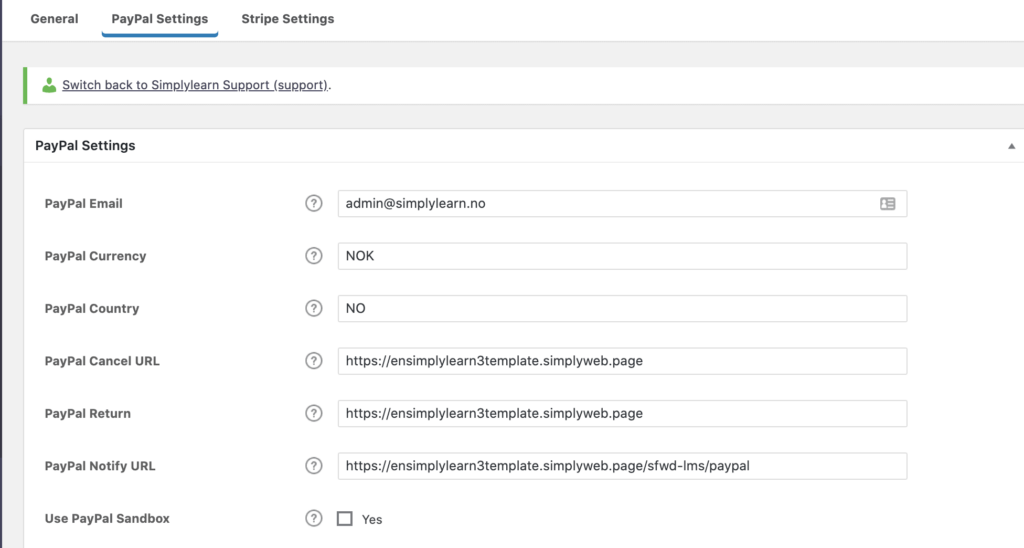
Your PayPal settings must be filled in before you can accept payments.
Let’s go through each option:
- PayPal Email: The email address that is used to set up your PayPal account
- PayPal currency: Insert the three-letter code that corresponds to the country in which you reside. E.g. (USD for United States Dollar, CAD for Canadian Dollar, AUD for Australian dollar). See the list of PayPal currency codes here.
- PayPal country: Two-letter code that corresponds to the country in which you reside. See a list of PayPal country codes here.
- PayPal cancel URL: This is where a user will be redirected if they cancel their payment, or the payment fails. You could create a custom page with your support or contact information, or simply send the user back to your homepage.
- PayPal return: This is where a user will be redirected after a successful payment is made. We recommend creating a custom “thank you” or “next steps” page, or sending them to a login or account page.
- PayPal Notify URL: This URL should be pre-populated for you, and should not be changed.
- If this option is blank, you should add the following URL, replacing “yoursite.com” with your real domain name. https://yoursite.com/sfwd-lms/paypal
- Use PayPal Sandbox: If you want to test a PayPal payment, you can set up a Sandbox account with PayPal.
When inserting URLs, remember to insert the full URL, beginning with https://.
See this support article for how you can start to sell your courses with Paypal.
Related Articles
How to set up Stripe
With SimplyLearn you can receive payments through PayPal and Stripe. We would recommend at least adding Stripe as a payment solution as this allows your customers to pay by credit card. Setting up Stripe can be a complicated process. If you want us ...How to sell your courses
With Simplylearn, you can sell your courses to your audience. To do this, you first need to set up your learning platform with Paypal or Stripe (or both!). See this help article for how to setup Stripe See this help article for how to setup Paypal ...How to insert powerpoints
This article will teach you two different ways to insert your powerpoints onto your platform. With this functionality you can reuse existing materials and your users will get a great visual experience of your presentations. The Google Drive route We ...Group access settings
If you have many participants joining a group, it can be very time-consuming to manually add all the course participants into a group. The group access settings allow you to define a set of criteria for how a user gains and maintains access to your ...Course access settings
The course access settings allow you to define a set of criteria for how a user gains and maintains access to your course. We’ll go through all the options, some of which include one-time payment, recurring payments, free access, prerequisites and ...