How to sell your courses
With Simplylearn, you can sell your courses to your audience.
To do this, you first need to set up your learning platform with Paypal or Stripe (or both!).
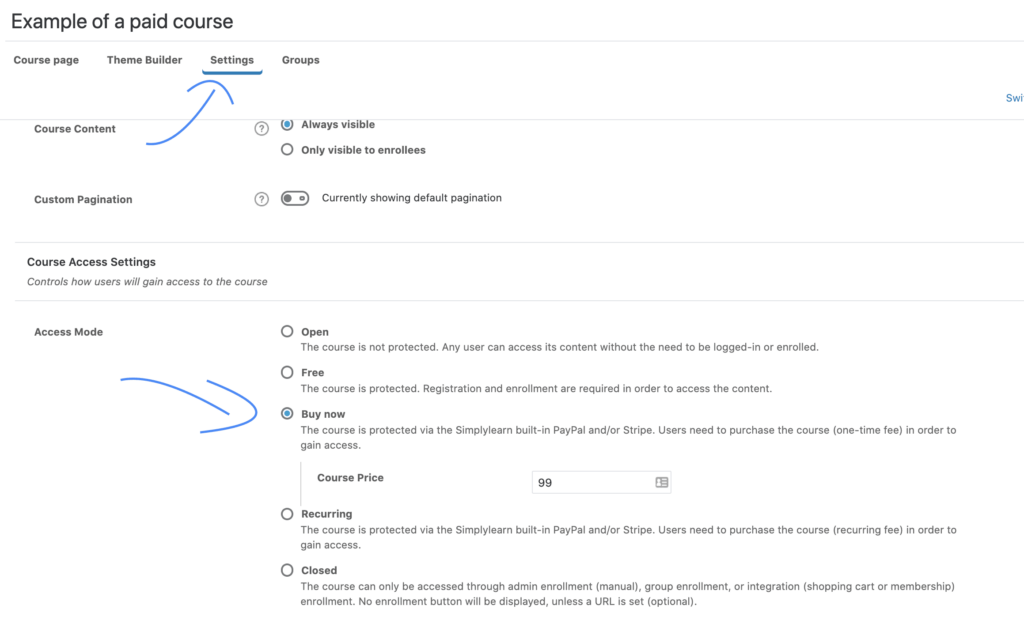
Secondly, you need to change the access mode and set the selling price for your course.
- Go to your course
- Click on the “settings” tab
- Go to “Course Access Settings”, choose the “Buy now” access mode. Insert your price.
Related Articles
New courses or changes are not immediately visible on SimplyLearn
Are you experiencing that your published courses or changes are not showing up immediately? If you have recently created a course or made changes on the platform and don't see them right away, you're not alone. This can be frustrating, but ...How to insert powerpoints
This article will teach you two different ways to insert your powerpoints onto your platform. With this functionality you can reuse existing materials and your users will get a great visual experience of your presentations. The Google Drive route We ...How to set up PayPal
SimplyLearn comes with built-in support for accepting payments via PayPal. If you don’t already have a PayPal account, you need to register. Before you accept any payments, your account must be verified (read more about verified accounts). Once you ...Course access settings
The course access settings allow you to define a set of criteria for how a user gains and maintains access to your course. We’ll go through all the options, some of which include one-time payment, recurring payments, free access, prerequisites and ...Clone a course
Sometimes it can be useful to use a previously made course as a starting point for your next course. You can clone your already existing courses. To do this, perform the following steps. Go to the list of your courses (SimplyLearn –> Courses), then ...